
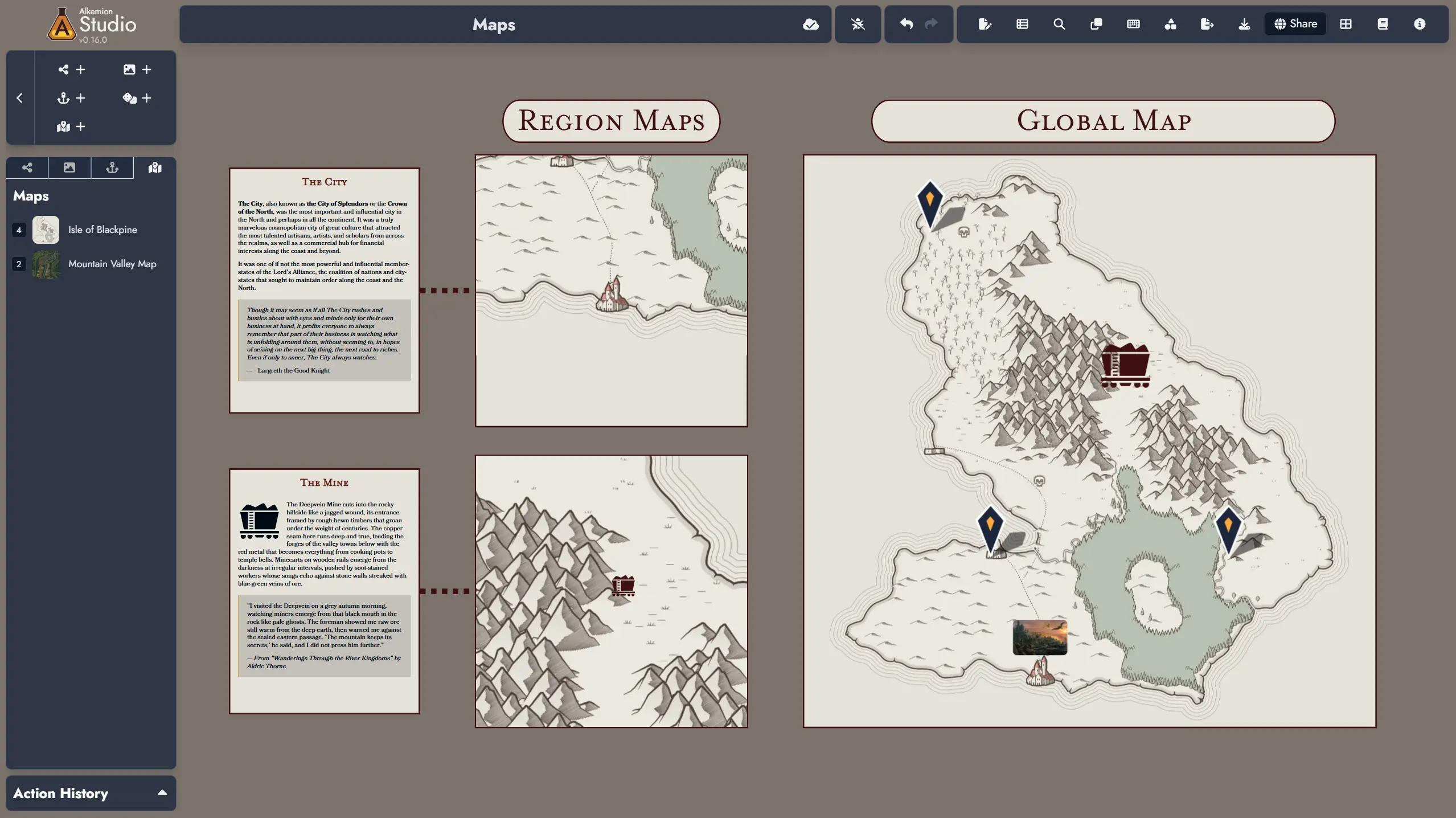
Hey everyone! We’re thrilled to share this update, which introduces Interactive Maps to Alkemion Studio. Create fully interactive geographical visualizations with Points of Interest that link to your Nodes. Creating new maps requires image upload capability in your account, though everyone can view and interact with maps in shared modules. We’ve also enhanced widget and token customization, added two new editor themes, and made numerous quality-of-life improvements. Hope you enjoy!
Major New Features:
- Interactive Maps: Create interactive maps from any image in your library. The new Map asset type brings geographical visualization directly into your modules.
- Map Editor: Design and manage your maps in a dedicated editor that works either full-screen or as a resizable floating window on the Board. Place Points of Interest (POIs) anywhere on your map, customize each one with labels, icons or images, and colors, and optionally link them to existing Nodes in your module.Map Tokens: Place Map Tokens on the Board just like any other asset. Resize them to fit your layout and customize their appearance with background colors, border styles, corner roundness, and mask overlays.Interactive Navigation: Every Map Token is fully interactive. Scroll in any direction, zoom in and out, click POIs to view details, and search for specific locations. Lock any Map Token to specific coordinates and zoom levels to highlight particular areas.Map embedding in the Editor’s pages is planned for a future release.
- Note: Interactive Maps requires image upload capability (available to Patreon supporters) to create new maps in your account. All users can view and interact with maps in shared modules.
New Features:
- Text Widget customization has been enhanced with new styling options. You can now switch between any font available in the themes and customize the outer border decoration and corner roundness.
- Image Widgets now support customizable border and corner roundness settings.
- Anchors (both Module and External Link types) now include customizable border and corner roundness settings.
- Corner Roundness setting upgraded across all compatible tokens. The single “Corner Roundness” parameter has been split into two independent controls: “Corner Width” and “Corner Height,” giving you more precise control over token shapes. This applies to all tokens that previously supported corner roundness customization, including the newly enhanced Text Widgets.
- Image Card layout enhancement: A new toggle lets you choose whether corner roundness applies to the inner featured image or to the overall card border, similar to how mask overlay targeting already works.
- New “Meridian” theme added to the Editor, featuring a warm scholarly aesthetic with golden bronze accents. Perfect for desert planets, Arabian-inspired campaigns, and scholarly expeditions.
- New “Moria” theme added to the Editor, featuring an ancient manuscript aesthetic inspired by Middle-earth and The One Ring. Perfect for Middle-earth campaigns, historical fantasy, and epic quests.
Fixes:
- The “Enter” key now validates the “Add an External Link” form when pressed in the title input field.
- Module Anchor default icons now display properly in the Board’s Asset Tree.
- The “Add featured image” button is now enabled in the “Notes” and “Token Card Content” sections of the Editor.
- “Ctrl + A” now works correctly in the title input of the “Save as a Template” window.
- Tag Scale is now included when copying and pasting Token settings.
- Pressing Backspace between list items now behaves as expected, removing unwanted lines with a single keystroke.
- Fixed an issue where deleting the content of a list item containing a nested item would create an unwanted line break before the nested item.
Changes:
- Removed quote characters and italic styling from blockquote elements in all page themes. This makes blockquotes more neutral and versatile, allowing for broader usage and easier customization.
- A loading screen now displays when accessing a Module directly via its URL.
Leave a Reply