

Hey, everyone!
We released Timelines in v0.18, and the release notes covered what the feature does. This post is about the thinking behind it, and some ways to use it that go beyond the obvious.
Timelines look like a calendar tool. They have a horizontal axis, a sequence of events, a left-to-right flow. That layout brings familiar assumptions along with it: meetings on specific dates, events tied to months and years, a battle on the fourteenth of the third month.
How you use them is the part worth exploring.
What the Board doesn’t show you
In Alkemion Studio, a Timeline is a “Construct”: a type of interactive asset designed to give you a different view of content you already have, rather than hold new content of its own. The interactive Map was the first Construct in Alkemion Studio. When you place Points of Interest on a map and link them to your location Nodes, you get a spatial view of content that already exists in your Module. The Board shows you how things connect. The Map shows you where they are.
A Timeline applies the same idea to sequence.
When you build a Timeline, you place References to Nodes you have already created and arrange them along a horizontal axis to explore their order and relationships. The same content, seen from a different angle.
This also shapes one of the key design decisions behind Timelines: a Reference always points to an existing Node. The content lives in the Node. The Timeline shows where it sits in the sequence. This keeps the Module coherent regardless of how many views you build over it.
What it is made of
For those who have not explored Timelines yet, the building blocks are straightforward.
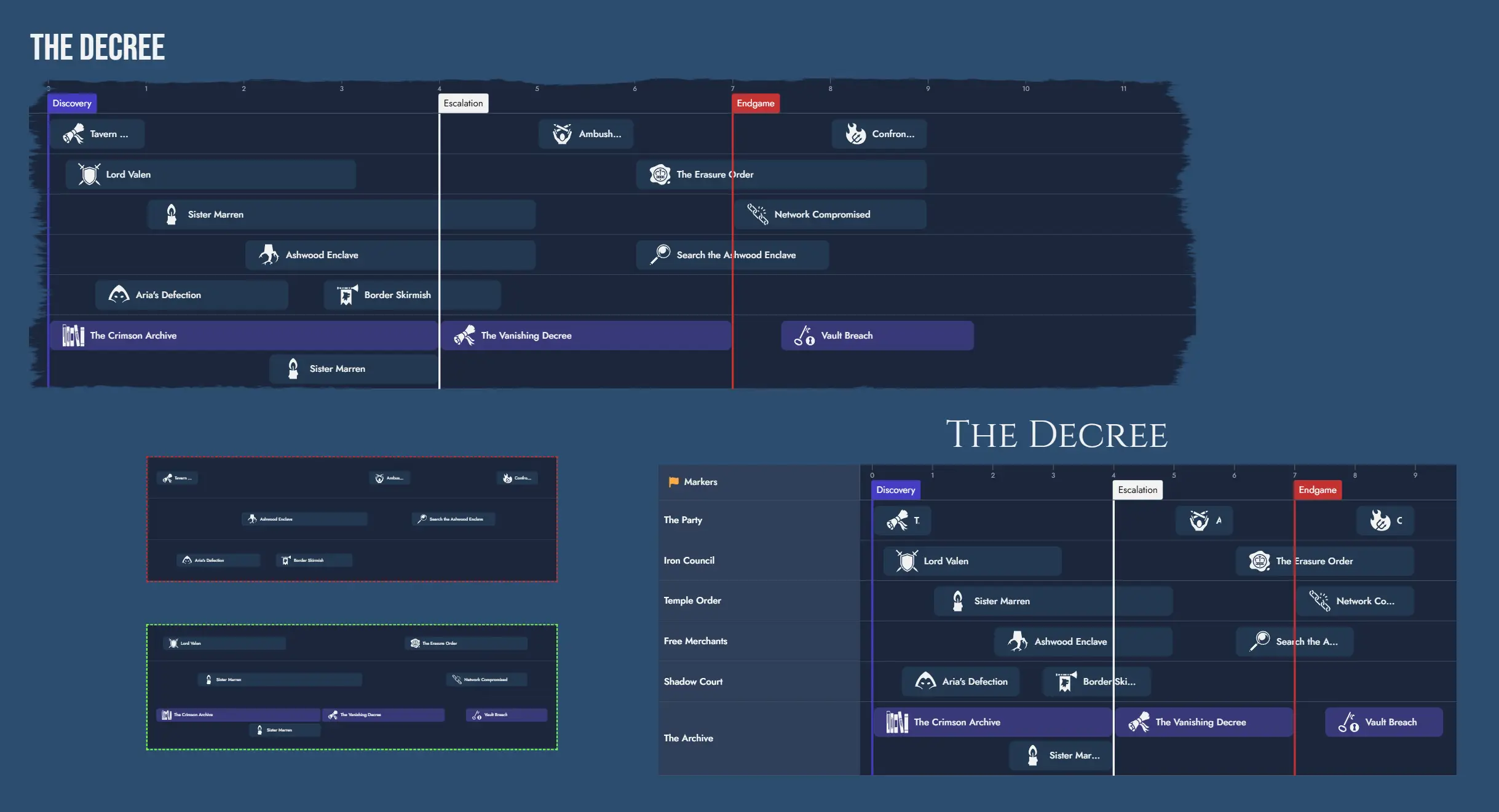
Lanes are horizontal tracks. Each Lane can represent whatever grouping is useful: a character, a faction, a plot thread, a scene type. Lanes can be collapsed, reordered, and renamed.
Markers are vertical dividers that label sections of the horizontal axis. Labels are freeform: dates, act breaks, session numbers, or anything you find useful. They exist to name sections of the sequence, nothing more.
References are the items you place inside Lanes. Every Reference points to an existing Node in the Module. Drag a Node from the Node Pool onto a Lane and you have created a Reference. Double-click it and the Node opens in the Editor. References can also span multiple units, which is useful when an event, condition, or arc covers a stretch of the timeline rather than landing on a single beat.
Five ways to use Timelines you might not have tried
Designing the pacing of an adventure
One of the hardest things to see when you are deep in design is whether your adventure breathes.
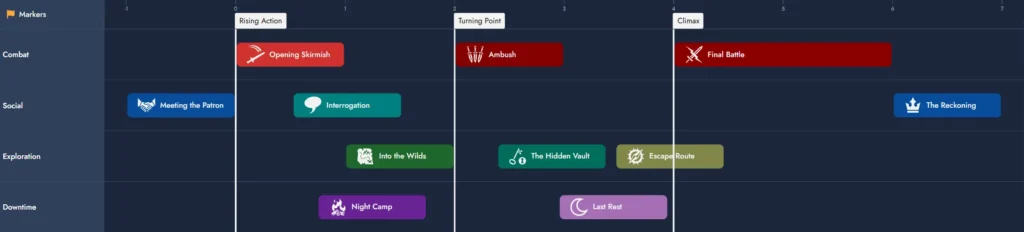
Set up a Timeline with a Lane for each scene type: combat, social, exploration, downtime. As you populate it with your scenes, the visual pattern shows you right away whether you have stacked five confrontations in a row or buried every social scene in the back half. Markers can label your major turning points so you can see whether the pacing serves the shape of the story.
The Board reveals how scenes connect. The Timeline reveals whether the sequence has rhythm.
The Knowledge Map
In a mystery or investigation, knowing who knows what, and when they knew it, is often the most important design question.
Set up a Lane for each significant character: player characters and key NPCs. References are not events but pieces of information. Place each one in a Lane at the point where that character learns it. Markers can mark revelations or session breaks.
What you get is a view of the knowledge gap between characters over time. At session three, the villain knows the players are onto him, but the players don’t know about the spy yet. That asymmetry is the drama. This Timeline doesn’t tell you what happens. It tells you who holds which cards, and when.

The Rumor Trail
In any living world, information has a path.
Set up a Lane for each channel through which information moves: the tavern, the thieves’ guild, the town guard, the noble court. Place References to your information Nodes at the point where each channel picks up that piece. The same Node can appear as multiple References across different Lanes at different positions.
The design question shifts from what players find to how the world carries information. A secret that reaches the city guard before the players get to it creates pressure. The same secret surfacing in two hostile factions at the same time creates conflict the players didn’t cause. The Timeline makes those dynamics visible before you write a single encounter.

The Alibi Grid
In a mystery, the contradictions are the design.
Set up a Lane for each suspect. Markers divide the timeline into the key windows of the crime: before, during, the alibi window, the discovery. References represent what each suspect was doing during each period. Spanning References represent claimed alibis.
What matters in the grid is where accounts overlap and where they break. Where do two suspects’ accounts conflict? Where does the airtight alibi have a window that doesn’t quite close? The shape of the grid tells you where the clues need to live. Build the alibi grid before you write a single clue, and the mystery has a structure that can hold up to player ingenuity.

The Threat Clock and the Front
Apocalypse World and Dungeon World both use the same structure: a threat advances through stages when players ignore it, ending in a doom that changes the world.
A Timeline maps this directly.
Set up one Lane per threat. References are the stages: “The cult recruits quietly,” “The ritual begins,” “The first sacrifice is made,” “The gate opens.” Markers are the thresholds: the point before which players can still act, and the doom that closes the clock. A spanning Reference represents a stage that lingers rather than resolving immediately.
To build a full Front, add more Lanes. Each Lane is a different threat within the same Front, all sharing the same doom Markers. When two threats converge on the same Marker at the same time, that is where the pressure peaks.
This Timeline is never the plot. It is the world’s momentum, running independently of what players choose to do. When players engage with a threat, you freeze its Lane. When they ignore it, you advance its References toward the Marker. The shape of the Front changes in play, and the Timeline holds that change.

What is coming
We are working on expanding the Editor’s content block system to support Construct blocks, alongside the existing Node and text blocks. This means you will be able to embed a Timeline or a Map directly inside an Editor Page.
For Timelines, this opens the door to sharing your campaign structure as a readable document, building a printed act-by-act overview of an adventure, or including a pacing reference directly in your session notes. We will share more on this as it develops.
We would love to know how you are using Timelines! If you have tried any of these approaches or found a use we have not thought of, come share it on our Discord.
See you soon,
The Alkemion Team
Leave a Reply